 Hack the Hydra
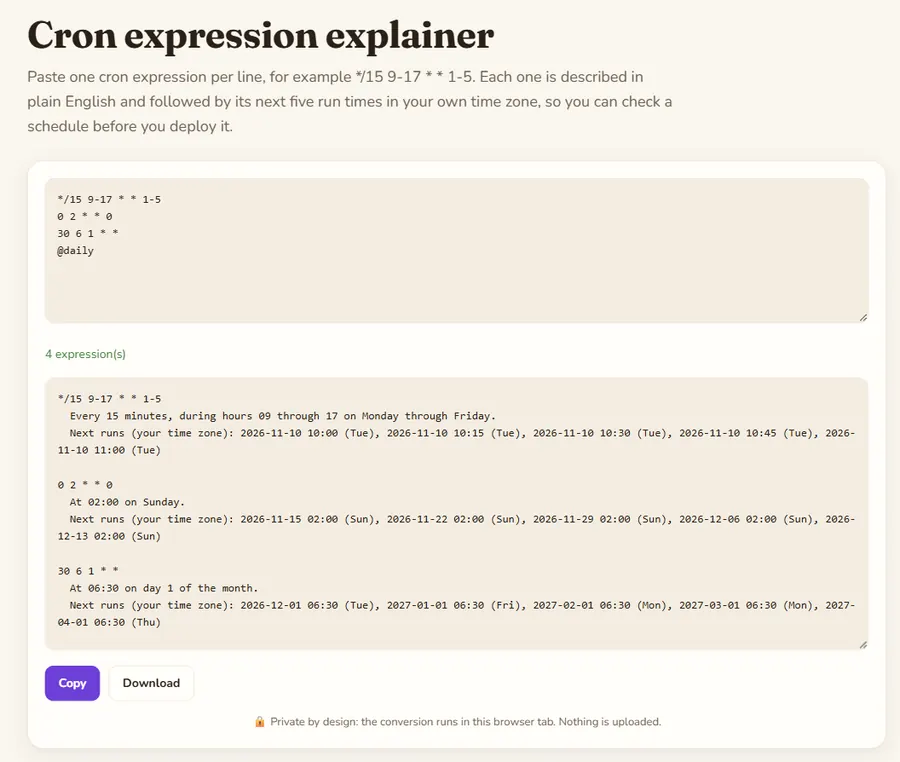
The five fields
A standard cron expression has five fields separated by spaces: minute (0-59), hour (0-23), day of month (1-31), month (1-12 or JAN-DEC) and day of week (0-7 or SUN-SAT, where both 0 and 7 mean Sunday). * means every value, a-b is a range, a,b,c is a list and */n or a-b/n is a step: */15 in the minute field means minutes 0, 15, 30 and 45.
The day-of-month and day-of-week trap
When both the day of month and the day of week are restricted, classic cron (Vixie cron, used by most Linux systems) runs the job when either one matches, not both. So 0 12 13 * 5 runs at noon on every 13th and on every Friday, not only on Friday the 13th. The next-run list below each description makes this visible.
Macros and limits
@yearly, @monthly, @weekly, @daily (or @midnight) and @hourly are expanded to their five-field form. Six-field expressions with seconds (Quartz, Spring) and the L, W and # extensions are not supported. Next runs are computed in your browser's time zone; servers often run cron in UTC, so check which one applies.
Example
Two schedules, computed on Tuesday 10 November 2026 at 10:07. Note the second one: day 13 OR Friday, as in standard cron.
Input
*/15 9-17 * * 1-5
0 12 13 * 5
Output
*/15 9-17 * * 1-5
  Every 15 minutes, during hours 09 through 17 on Monday through Friday.
  Next runs (your time zone): 2026-11-10 10:15 (Tue), 2026-11-10 10:30 (Tue), 2026-11-10 10:45 (Tue), 2026-11-10 11:00 (Tue), 2026-11-10 11:15 (Tue)

0 12 13 * 5
  At 12:00 on day 13 of the month or on Friday.
  Next runs (your time zone): 2026-11-13 12:00 (Fri), 2026-11-20 12:00 (Fri), 2026-11-27 12:00 (Fri), 2026-12-04 12:00 (Fri), 2026-12-11 12:00 (Fri)