 Hack the Hydra
How to convert Excel to JSON
Open the Excel to JSON tool, drop your XLSX, XLS, ODS or CSV file (or paste CSV), and copy or download the result. The first row becomes the keys, and each following row becomes one object. Nothing is uploaded.
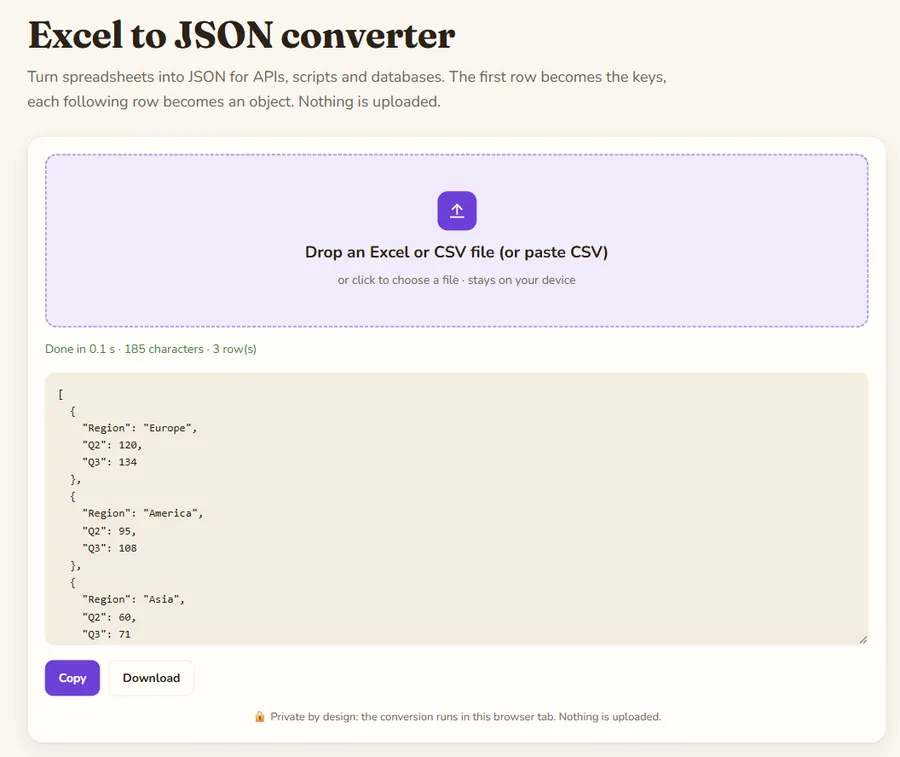
Prepare the spreadsheet
The conversion trusts your first row, so spend a minute on it:
- Put clear, unique column names in row 1 (
email,unit_price). Duplicate names would overwrite each other as keys. - Remove title rows, merged cells and blank lines above the header.
- Avoid totals rows at the bottom unless you want them as data.
Steps
- Open Excel to JSON.
- Drop the file. For plain CSV you can also paste the text.
- Check the output on screen.
- Copy it, or download the .json file.
For a CSV only, CSV to JSON is a direct route.
What does the JSON output look like?
A workbook with a single sheet becomes an array of objects:
[
  {"name": "Anna", "city": "Lyon", "age": 31},
  {"name": "Marc", "city": null, "age": 27}
]
With several sheets you get one object keyed by sheet name, each holding its own array. Empty cells become null.
Why do dates and numbers cause trouble?
Values are exported as Excel computed them. Dates are stored in Excel as serial numbers (for example 45000), and they come out that way unless the cell is formatted as text. Before importing the JSON anywhere, check your date columns. A simple fix is to format the date column as text in Excel, or convert the serial numbers in your code. Identifiers such as phone numbers or product codes with leading zeros should also be stored as text in the sheet, or the zeros are lost before the converter ever sees them.
Typical uses of the JSON
- Seeding a database or a test fixture with real data.
- Feeding a chart library or a web page that loads a local file.
- Sending a batch of records to an API that accepts JSON.
- Sharing a table with a developer in a format they can use straight away.
If your API expects different key names, rename the header cells in Excel before converting rather than editing the JSON afterwards.
One more check: open the JSON and look at the first and last objects. If the last one contains totals or notes, delete those rows from the sheet and convert again, so the data array only holds real records.
Next steps
Paste the result into the JSON formatter to validate and prettify it. Then load it in your script, API or database. Large files work, but everything is held in browser memory, so split very big workbooks.
Privacy: the file is processed in your browser tab and is not uploaded to a server. Once the page has loaded you can even disconnect from the internet and it keeps working.
FAQ
Can I paste CSV instead of uploading?
Yes, the tool accepts pasted CSV text as well as files.
Which file types are supported?
XLSX, XLS, ODS and CSV.
Why are my dates numbers?
Excel stores dates as serial numbers. Format the column as text before converting, or convert them in your code.
Is my spreadsheet uploaded?
No, the conversion runs in your browser.
Last updated: November 2026. Facts about third-party tools come from their public repositories and documentation. Check licenses before commercial use.