 Hack the Hydra
How to convert PDF to Markdown for LLMs
Short answer: extract the PDF to Markdown (headings, lists, tables), remove repeated headers and footers, then either paste it into the chat or split it on headings into chunks for retrieval. Use OCR for scanned pages. A free in-browser converter handles single files, and an API handles batches.
Free PDF to Markdown converter →
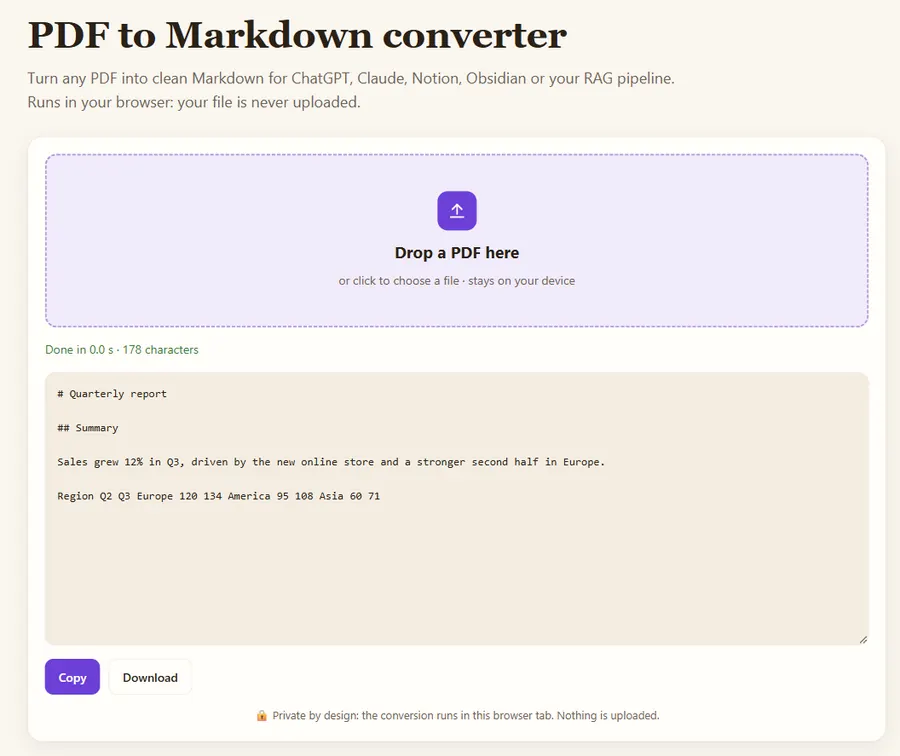
1. Extract
Use a converter that keeps structure. Open the PDF to Markdown converter, drop your file, and download the .md. If the result is nearly empty, the PDF is scanned: use OCR or the API.
2. Clean
Delete running headers, page numbers, tables of contents and legal boilerplate. They waste tokens and pollute retrieval.
3. Structure
Check that section titles became Markdown headings. If not, add # and ## yourself: headings are what both the model and your chunker rely on.
4. Use
Chat: paste the Markdown and ask the model to cite the heading it used. RAG: split on headings, cap chunks around 500–1,000 tokens, store the heading path as metadata. See PDF to Markdown for RAG.
5. Scale
For hundreds of files, call the PDF to Markdown API from your pipeline. It detects tables, OCRs scanned pages and only charges for successful files.
Worked example: a 12-page report
Suppose you want a model to answer questions about a 12-page annual report. A typical page of dense English text is around 500 to 700 words, which is roughly 700 to 1,000 tokens, so the whole report is about 10,000 tokens: small enough to paste into most current chat models in one go.
- Convert it with the PDF to Markdown converter.
- Delete the cover page, the table of contents and the repeated footer ("Annual report 2025 | page 7").
- Check that the two financial tables came out as Markdown tables. If one did not, copy it from the PDF by hand; tables are where answers usually come from.
- Paste it with a short instruction: "Answer only from the report below. Quote the section heading you used."
For a 300-page manual the same text would be around 250,000 tokens. Do not paste it: split it on headings and use retrieval instead.
Should you paste the Markdown or retrieve it?
| Situation | Paste the Markdown | Chunk + retrieval |
|---|---|---|
| One document, under ~50 pages | Yes | Not needed |
| Many documents or a whole library | No | Yes |
| Questions that need the whole document (summaries) | Yes | Harder |
| Precise lookups in long manuals | Costly | Yes |
Which pitfalls should you check before trusting the answers?
- Two-column layouts can come out interleaved. Read one page of the output to confirm the order.
- Scanned pages have no text layer; the converter returns nothing for them. Run OCR on those pages first.
- Footnotes and captions may land in the middle of a paragraph. Move or delete them if they break sentences.
- Hyphenation at line ends ("infor- mation") should be joined back; good converters do this, check a few lines.
FAQ
Why Markdown instead of plain text?
Markdown keeps structure (headings, lists, tables) at almost no token cost, which improves both answers and retrieval.
How many tokens is a PDF page?
Typically 400 to 800 tokens of English text per page, more for dense papers.
Can I paste a whole PDF into ChatGPT or Claude?
Short documents, yes. Long ones are better split on headings and searched with retrieval, which is cheaper and more precise.
Last updated: November 2026. Facts about third-party tools come from their public repositories and documentation. Check licenses before commercial use.