 Hack the Hydra
How to give a PDF to ChatGPT
Short answer: for short, text-based PDFs, uploading the file works. For long, complex or scanned PDFs, convert the PDF to Markdown first, remove the parts you do not need, and paste it with a prompt that asks ChatGPT to answer only from the document and to cite the section heading. Scanned PDFs need OCR first.
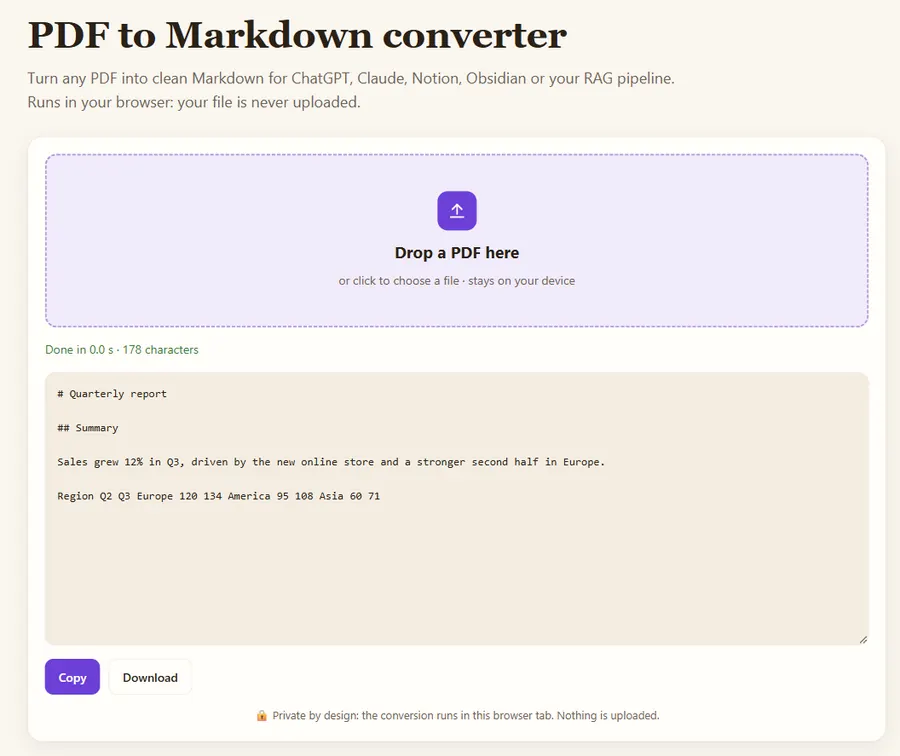
Free PDF to Markdown converter →
Option 1: upload the PDF
Fastest, and fine for short, text-based documents. The downside is that you do not see what the model actually extracted. Repeated headers, broken tables and missing scanned pages are invisible to you.
Option 2: paste Markdown (most reliable)
Convert the file with the PDF to Markdown converter. You can check and trim the text, and the headings let ChatGPT point to the exact section it used. This is the best option for contracts, specs, papers and manuals.
Option 3: paste plain text
Copying text out of a PDF viewer loses structure: columns get mixed, hyphenated words break, and tables turn into number soup. Avoid it for anything longer than a page.
Prompt template
Below is a document in Markdown between <doc> tags.
Answer only from the document. If the answer is not in it, say so.
For each claim, cite the section heading you used.

<doc>
(paste Markdown here)
</doc>

Question: ...
What about long PDFs?
If the document does not fit, split the Markdown on its # and ## headings and work section by section, or keep only the sections relevant to your question.
What about scanned PDFs?
If the converter returns almost no text, the PDF is a scan. Run the page images through image-to-text OCR, or use the API, which OCRs scanned pages automatically.
Worked example: a 40-page supplier contract
Say you want to know the termination notice period and the late-payment penalty in a 40-page contract. Uploading the PDF and asking "what is the notice period?" often works, but when it fails you cannot tell whether the clause was missed, merged with a footer, or never extracted.
The reliable route takes about three minutes:
- Convert the PDF with the PDF to Markdown converter. Clauses come out as headings such as
## 12. Termination. - Delete what you do not need: the cover page, the signature blocks, the annexes with price lists. A 40-page contract often shrinks to 10 pages of relevant text.
- Paste it with the prompt template above and ask both questions at once.
The answer now reads like "Section 12.2: 90 days written notice; Section 8.4: 1.5% per month on overdue amounts". You can check both numbers against the Markdown in seconds, which is the whole point: you see exactly what the model saw.
Which option should you use?
| Your PDF | Best option | Why |
|---|---|---|
| 1 to 10 pages, normal text | Upload | Fast, little can go wrong |
| Long report, contract, manual | Paste Markdown | You trim it, and headings make answers citable |
| Tables of numbers | Paste Markdown, check the tables | Copied text mixes rows and columns |
| Scanned or photographed pages | OCR first, then paste | A scan has no text layer to read |
| Hundreds of PDFs | Convert in bulk, then use retrieval | Too large for one chat; search the chunks instead |
What are the common mistakes?
- Asking about a page number. "What does page 17 say?" fails because the extracted text rarely keeps page numbers. Ask about the section heading or quote a phrase instead.
- Trusting numbers from tables without checking. Compare any figure you plan to reuse with the original PDF.
- Pasting several documents without labels. Wrap each one in its own tags (
<doc name="contract">,<doc name="offer">) so the answer can say which document a fact comes from. - Not asking for "not found". Without the instruction to say when the answer is missing, a model may fill the gap with a plausible guess.
FAQ
Why does ChatGPT miss things in my PDF?
Usually because the extracted text is incomplete or out of order (columns, tables, scanned pages). Converting to Markdown and checking the result fixes most cases.
Is it safe to paste confidential PDFs?
The converter on this site runs in your browser and uploads nothing. What you paste into ChatGPT is governed by your ChatGPT plan and data settings.
Can ChatGPT read a scanned PDF?
Only if the text is recognised first. Run OCR on the pages, check the text, then paste it; otherwise the model may see little or nothing.
Last updated: November 2026. Facts about third-party tools come from their public repositories and documentation. Check licenses before commercial use.